Once an invoice has been created, the review page opens where you go over it before sending.
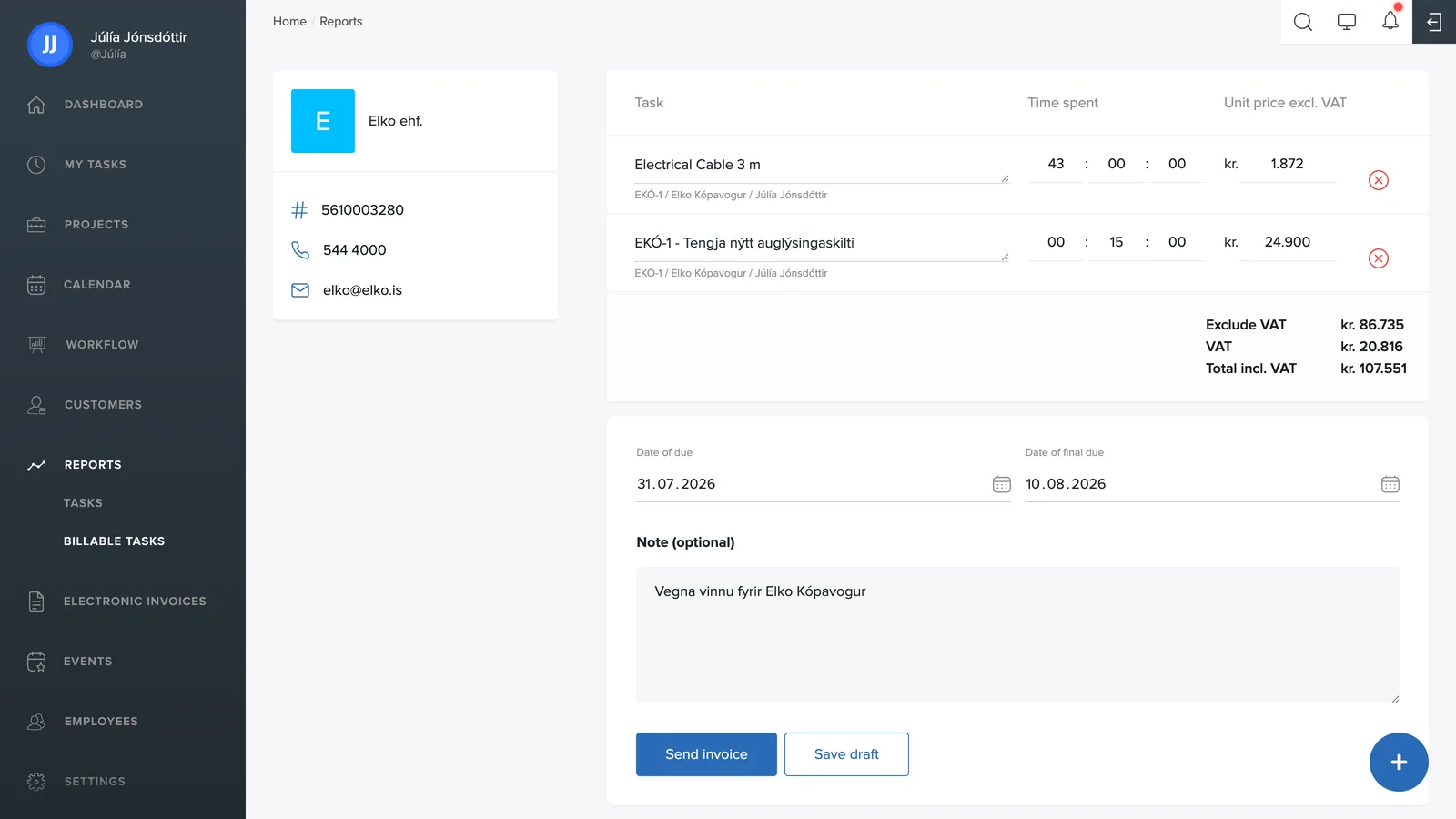
The review
On the left you see the customer: name, national ID number, phone and email as recorded in the customer directory.
On the right are the invoice lines: task, number of hours and unit price excluding VAT. Products logged on the task also appear as lines – for example materials from a linked electronic invoice, like the electrical cable in the picture. You can adjust the hours and prices directly in the lines, or remove a line with the red x. Below, you see the total amount, VAT and total including VAT.
Dates and note
- Invoice due date and final due date: the default final due date is set in Settings → Invoices.
- Note (optional): text that appears on the invoice, e.g. "For work at Gæðavegur 10".
Send or save
- Send invoice: sends the invoice to the customer.
- Save as draft: stores the invoice under Invoice drafts so you can finish it later.
If your company uses an external accounting system, invoices can be created as drafts there instead of being sent right away. The toggle Enable invoice drafts in external accounting systems is under Settings → General (supports e.g. Payday and DK).